I simply love the chime of e-mail in my in-box. I’m especially happy when it’s a blog comment from a reader. If you feel the same, here’s some gadget images to choose from to add to your side-bar to let your readers know that you appreciate the notes they leave behind.
To add a (non-linking) comment gadget to a blogger blog:
Choose the image you want and drag or copy to your desktop or a file folder.
Go to CUSTOMIZE on your blog
Choose ADD A GADGET
Choose PICTURE
Type in something like “Thanks Visiting” or “Come Back Soon!” or simply leave it blank.
For the image, BROWSE to the image you want to use
Click SHRINK TO FIT (optional) and SAVE
Back on your CUSTOMIZE page, drag your new comments gadget to wherever you want it on your page.
Let me know you grabbed a gadget and I will visit your blog and leave you a comment! freegadgets UPDATE/IRONY: The comments section of this blog post has been hit very hard by spammers. Therefor I am disabling the comments section for the time being.
I recently came across this photo from Country Living’s website of a pickle jar full of old tomato pincushions. I couldn’t get the image out of my mind for days.
So, I began collecting vintage tomato pincushions. I picked up a few at the second-hand craft store (yes, there’s such a thing in our area, The Legacy in Sebastopol.) Then I started scouring eBay and Etsy for reasonably priced ones. And within a week I had my collection. Ok, sort of a cheater-collection, but I have a thing about instant gratification.
I even found a fun pickle jar for 5 bucks at the antique fair last weekend. So now I’m overflowing with darling functional produce and so many ways to display them!
Do you have a quirky collection? I’d love to hear about it!
And speaking of pickling, I thought I’d dig up a post from the past that I did for my guest mom stint on the Design Mom blog, enjoy! LINK
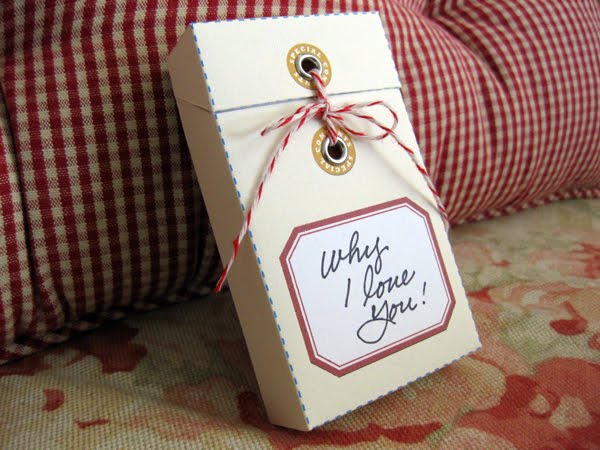
My friend Amy, of Living Locurto, asked if I would create a guest blog post for a Mother’s Day project. If you don’t know Amy, you’ve been missing out on a lot of scrumptious art freebies over on her website, so get over there! I have been working on a project for my mom and made a tutorial to share with you, and in keeping with spirit of freebies, I have created one of the designs with the fabulous free vintage wallpaper graphics of a another blog-friend, Karen, The Graphics Fairy!I created a gift to fill with many little notes reminding my Mom why I love her so much and the little things that she has done in my life that mattered. (I’m only showing a few, my mom reads my blog daily and although now she’s going to know one of the things she’s getting, I still have to keep a few little notes a surprise!…Hi Mom.)I designed a template based on the construction of a cigarette box, (no, I don’t smoke, but still think it makes for a great little package pattern.) I designed this box to fit business card size notes. You can use the designs provided, or utilize the blank template for use with scrapbook paper, or any other paper you’d like, but it’s best to print and construct the box with card stock to keep it rigid. A really big Thank You! to Amy for making the PDF files easy to download, just click on any template image.
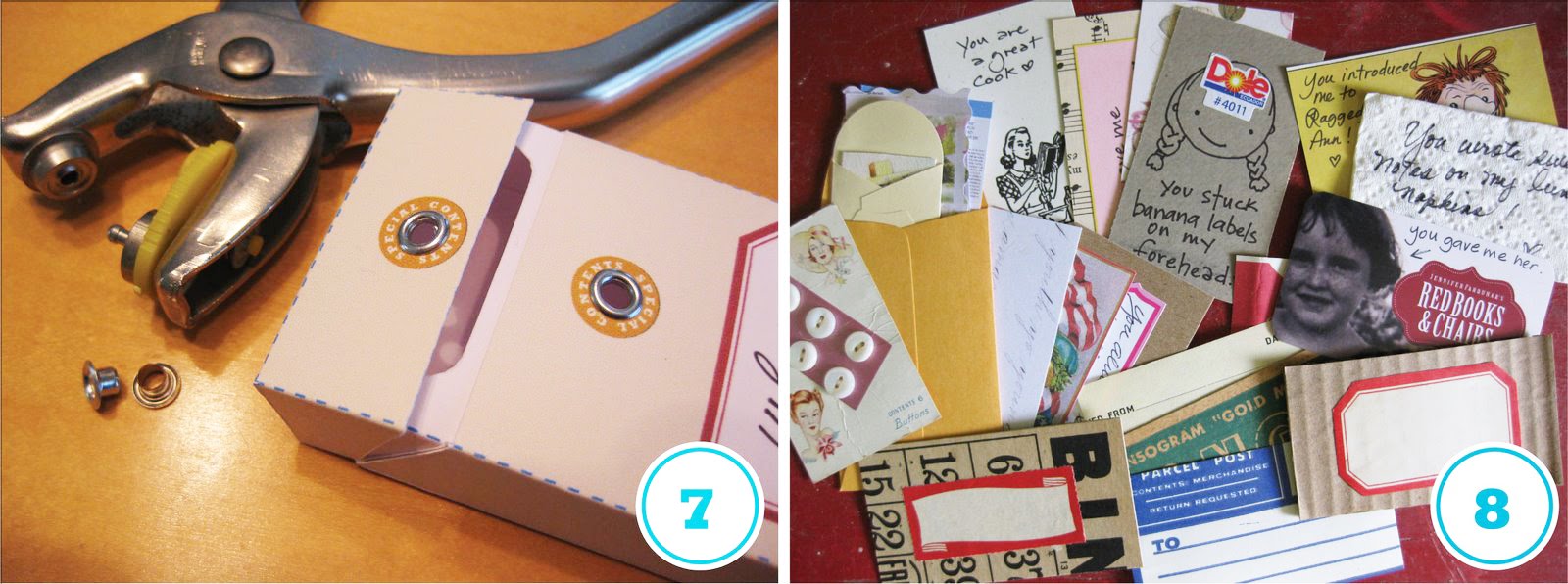
To make the Message Box:(1) Print the template you choose onto white card-stock. If printing the Manilla box, write your “To” and “From” info before trimming and folding (in case you make a mistake in writing, you will not have already gone through all the assembly!) (2) Trim out the template, cutting notches and slices where marked. Score (press deep crease with dull pointed object) along all fold lines. Scoring is essential to the success of this project!(3) Fold along all fold creases. (4) & (5) Using double-stick tape or other paper adhesive, secure the under-lid flap and tuck and tape side panel flaps and flaps on the lid as shown. (6) Use adhesive to attach the inside panel, slide into position and stick.(7) Punch holes in center of reinforcement circle graphic and add an eyelet if you’d like.(8) & (9) For the Manilla Message Box, cut out business card size (2″ x 3.5″) pieces of paper, cardboard, vintage ephemera, etc. and add a sentiment to each. Embellish with stickers and more. (10) For the Wallpaper box, simply cut out plain cardstock, write on each, and gather with the “Mother” wrap-around cut-out.
Finally, tie your box with ribbon or string and send along to your mom to let her know just how much she means to you!
BONUS FEATURE: You can use this craft for other purposes:
Fill with 30 little notes for your friend who’s turning 30. 40 for 40, etc.
Use as a file for business cards you pick up here and there.
Make several boxes to organize small craft supplies.
Before printing the wallpaper template, cover the wording with a white box to erase the type and add your own for another occasion or purpose.
Use the basic template to create custom boxes for product packaging.













Leave A Comment Gadgets
FOR MORE FUN FREE GADGET IMAGES, CLICK HERE!
To add a (non-linking) comment gadget to a blogger blog: